
Welcome to CardanoPropertySolutions.co
Revolutionizing Property Investment
CardanoPropertySolutions.co is your gateway to modern property investment, leveraging blockchain technology to make property ownership easier, faster, and more inclusive.
Why Choose Us?
- Tokenization & Fractionalization: Own a fraction of a property and enjoy the benefits of investment without the high costs.
- Powered by Cardano: Experience secure, scalable, and low-cost transactions on the Cardano blockchain.
- User-Friendly Interface: Navigate seamlessly through our platform to post properties, mint tokens, and manage your investments.
Features
- Post Property: List your property quickly and efficiently.
- Mint Tokens: Convert property ownership into tradable blockchain tokens.
- Buy & Sell Tokens: Trade property shares effortlessly.
- Update and Cancel: Manage your tokenized assets with ease.
Getting Started
- Register: Create an account and explore the platform.
- Login: Access your personalized dashboard.
- Post Property: Start listing your properties for tokenization.
Explore More
- Learn how tokenization and fractionalization work in our Introduction.
- Follow the detailed steps in How it Works.
Visit Us
Dive into the world of blockchain-enabled real estate investment at CardanoPropertySolutions.co.
Join the Revolution
Take the first step towards democratizing real estate investments. Your journey to modern property ownership starts here!
Introduction
Welcome to CardanoPropertySolutions.co, an innovative platform built for prototyping and implementing tokenization and fractionalization using the Cardano blockchain.
What We Do
CardanoPropertySolutions.co leverages the power of blockchain technology to transform the way property investments are managed and owned. The platform introduces groundbreaking solutions to:
- Lower Investment Costs: Through fractional ownership, investors can acquire shares of a property without the need for significant upfront capital, making real estate investment more accessible.
- Accelerate Property Sales: By digitizing assets into blockchain-based tokens, the platform eliminates traditional inefficiencies, allowing properties to be bought and sold more quickly.
- Distribute Wealth Equitably: Fractionalization enables a broader audience to participate in property ownership, fostering a fairer and more inclusive distribution of wealth.
Explore More
Visit us at CardanoPropertySolutions.co to learn more about how we are revolutionizing the property market.
Why Choose Cardano?
By utilizing the Cardano blockchain, the platform benefits from its scalability, security, and low transaction costs, ensuring a seamless and reliable experience for users.
CardanoPropertySolutions.co is more than just a platform—it’s a gateway to democratizing real estate investment, making it fairer, faster, and more affordable for everyone.
Prerequisite: Nami Wallet
Before you can sell tokens (shares), you must have the Nami Wallet set up and connected. This section explains what the Nami Wallet is and how to prepare it for transactions.
What is Nami Wallet?
Nami Wallet is a browser extension for managing Cardano blockchain assets, including ADA and native tokens. It provides an easy-to-use interface for sending, receiving, and managing your tokens. It also allows you to interact with decentralized applications (dApps) securely.
Why is Nami Wallet Needed?
To sell tokens (shares), you need a wallet to:
- Store Your Tokens: Nami Wallet holds the tokens (shares) you own for your property.
- Process Transactions: All buy and sell transactions are submitted through your Nami Wallet to the Cardano blockchain.
- Track Balances: After a successful sale, you can check your updated token balance directly in the wallet under the Collectibles section.
How to Set Up Nami Wallet
Follow these steps to set up your Nami Wallet:
1. Download and Install Nami Wallet
- Go to the official Nami Wallet website.
- Click Download and install the extension for your browser (supported browsers include Chrome, Brave, Edge, etc.).
2. Create or Restore a Wallet
- Open the Nami Wallet extension.
- If you’re new to Nami:
- Click on Create Wallet.
- Follow the on-screen instructions to generate a new seed phrase.
- Securely save your seed phrase, as it’s the only way to recover your wallet.
- If you already have a Nami Wallet:
- Click on Restore Wallet.
- Enter your existing seed phrase to recover your wallet.
3. Fund Your Wallet
- Add ADA to your Nami Wallet for transaction fees.
- You can purchase ADA on an exchange (e.g., Binance, Coinbase) and send it to your wallet address.
4. Connect Your Wallet
- Ensure your wallet is connected to the application or platform where you’re managing your tokens.
- You will typically see a Connect Wallet button on the platform. Click it and authorize the connection.
Verifying Your Wallet
Before selling tokens:
- Open your Nami Wallet and check the Collectibles section to confirm your token balance.
- Ensure you have sufficient ADA for transaction fees.
Troubleshooting
- If your wallet won’t connect: Refresh your browser and try again.
- If you lose your seed phrase: Unfortunately, it cannot be recovered. Always store it securely.
- For more help: Visit the Nami Wallet Support Page.
With your Nami Wallet set up, you're ready to proceed with selling tokens (shares)!
How it works
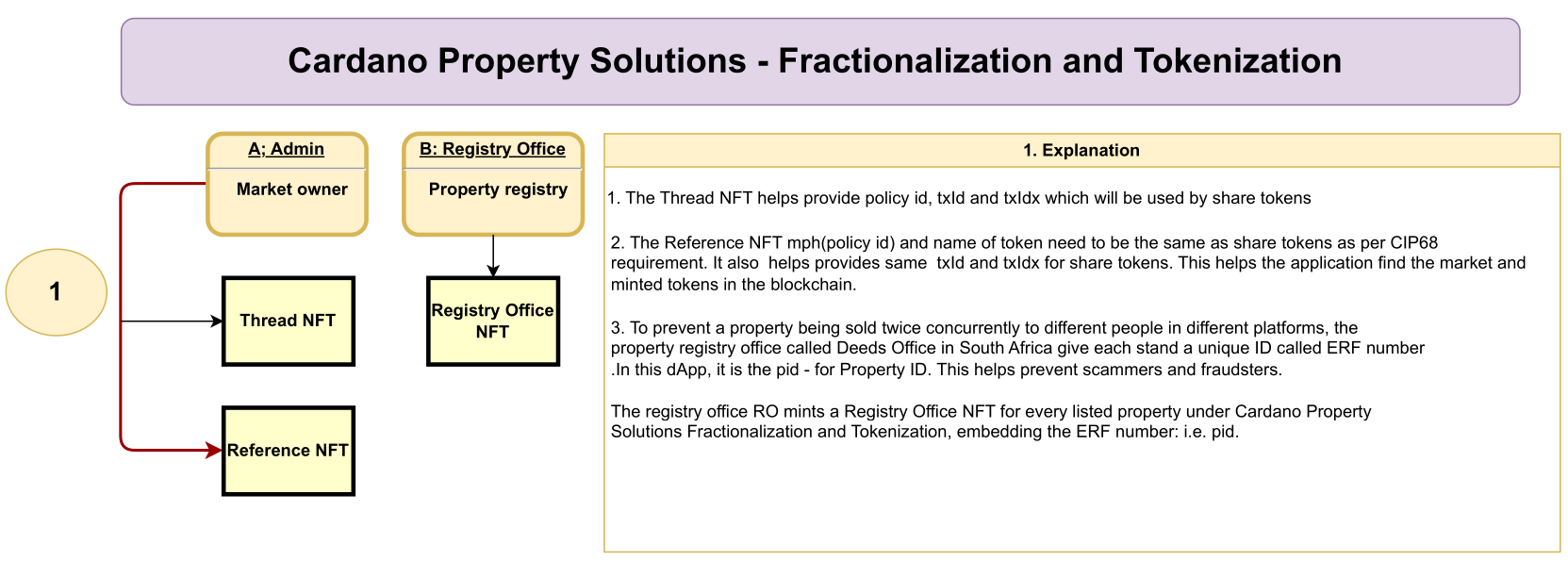
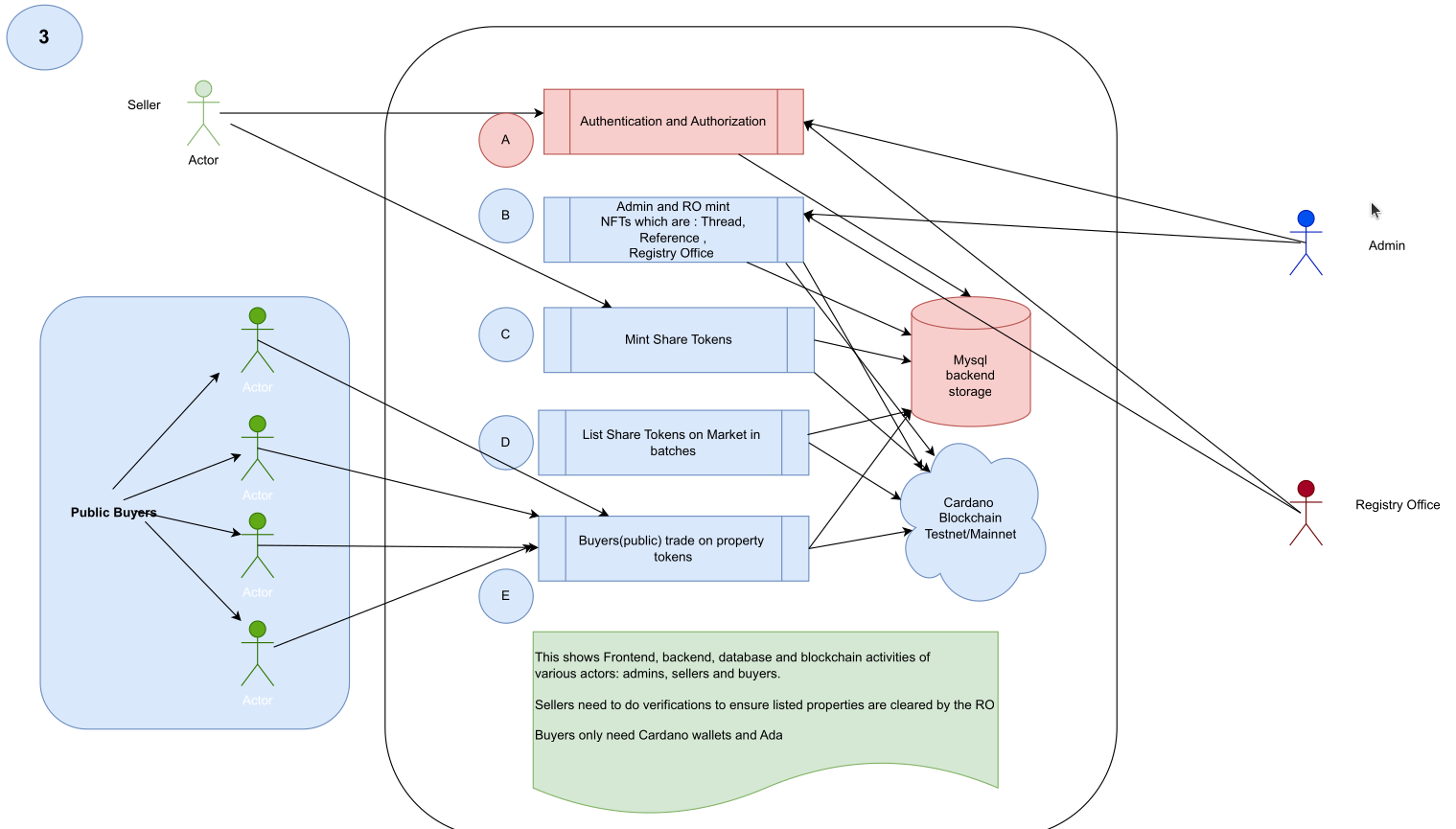
- Market set up requires the Property Owners to clear their property and get tokenization Registry Office ID to prevent double sales.
- Market owner mints Reference Token and Thread Token. Registry Office mints the Registry Office Token. These tokens are CNFT and are locked on seperate scripts.
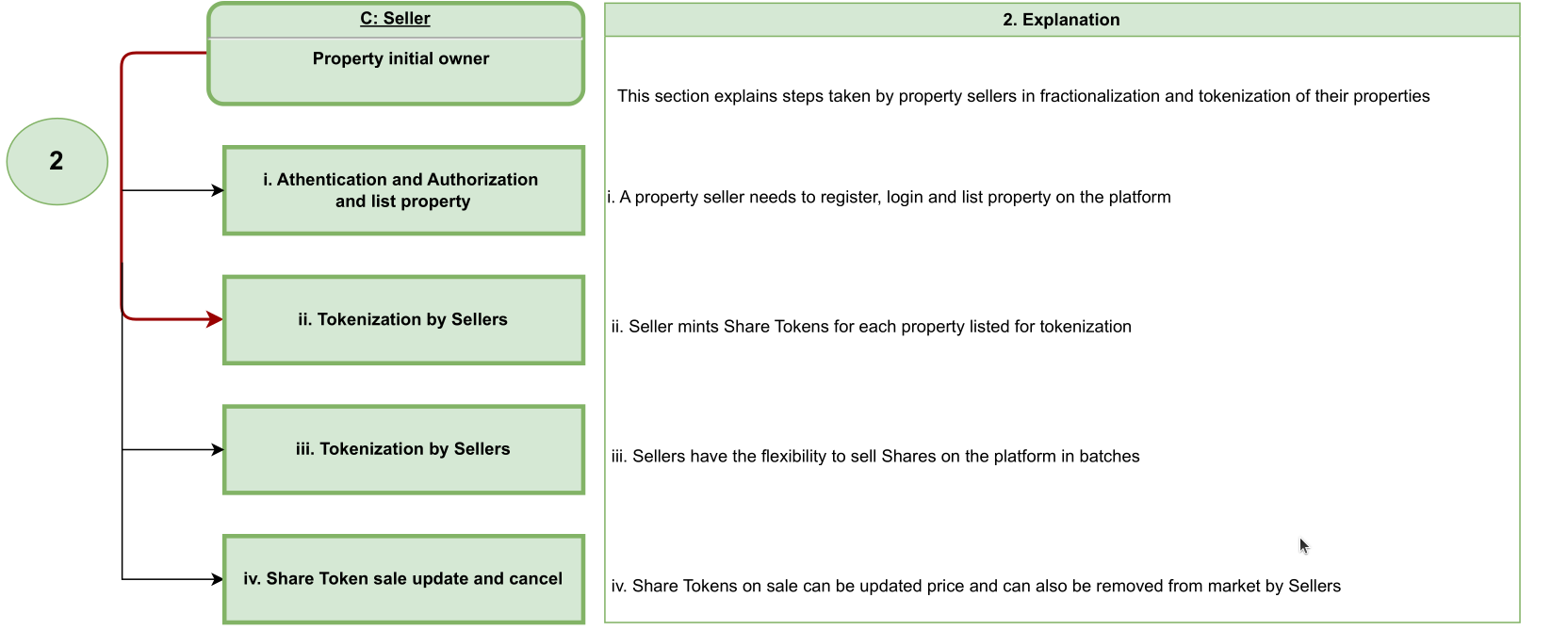
- Then Home Sellers register and list their properties and the system immediately provides Tokens Fractionalization and minting feature for each posted property. Sellers can adjust total tokens and/or prices, then mint share tokens to their wallet addresses.
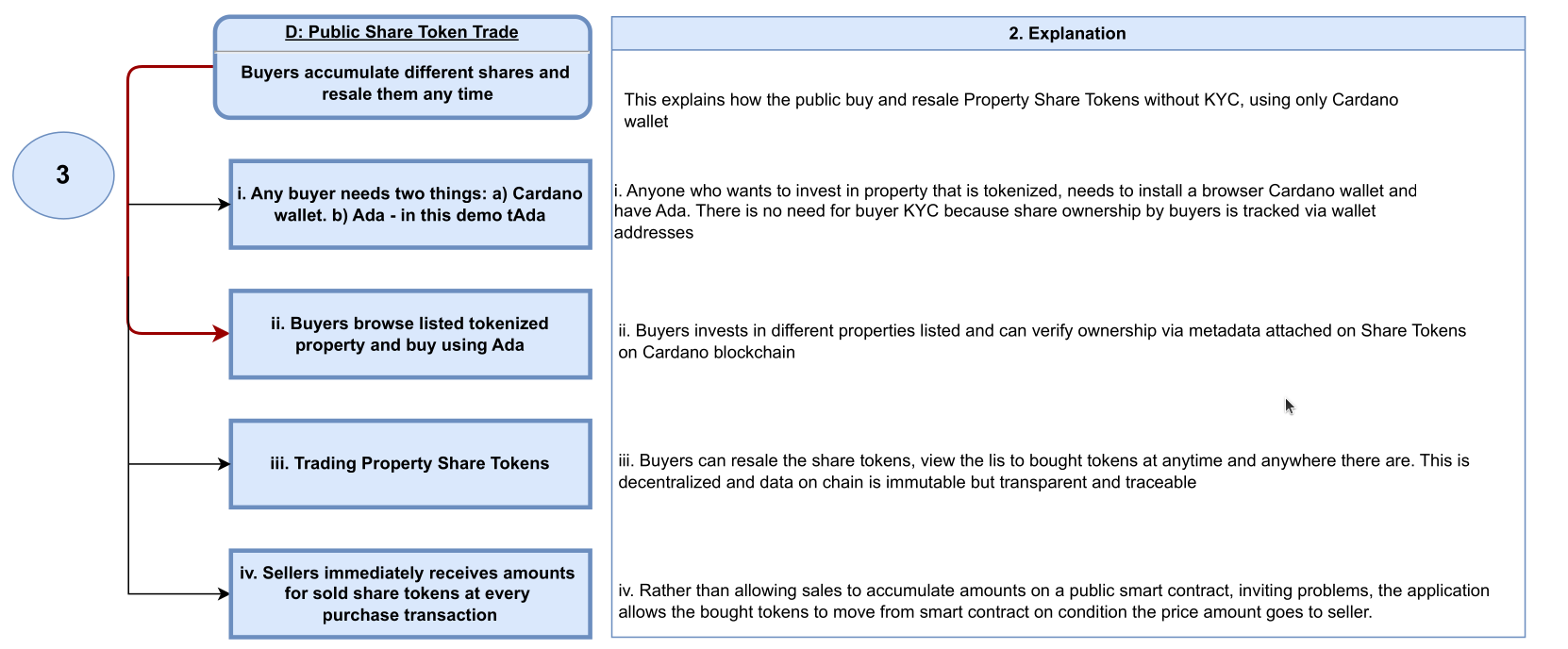
- Then property owners put groups of tokens on sale, allowing the public to purchase them anytime anywhere using Cardano wallet addresses.
- For every bought token the correct amount is sent to the seller address in an atomic way. This is done by the smart contract.
- Sellers can cancel sale, update sale or even buy back some of the tokens. This brings liquidity and flexibility.
- Bought property share tokens can be resold easily anytime and are verifiable onchain.
- The app has reports for market activities.
The diagrams below help explain the above deeper and one can check this video for how this works. Cardano Property Solutions Presentation Bernard Sibanda2024 12 28 23 00 GMT+2
Registration
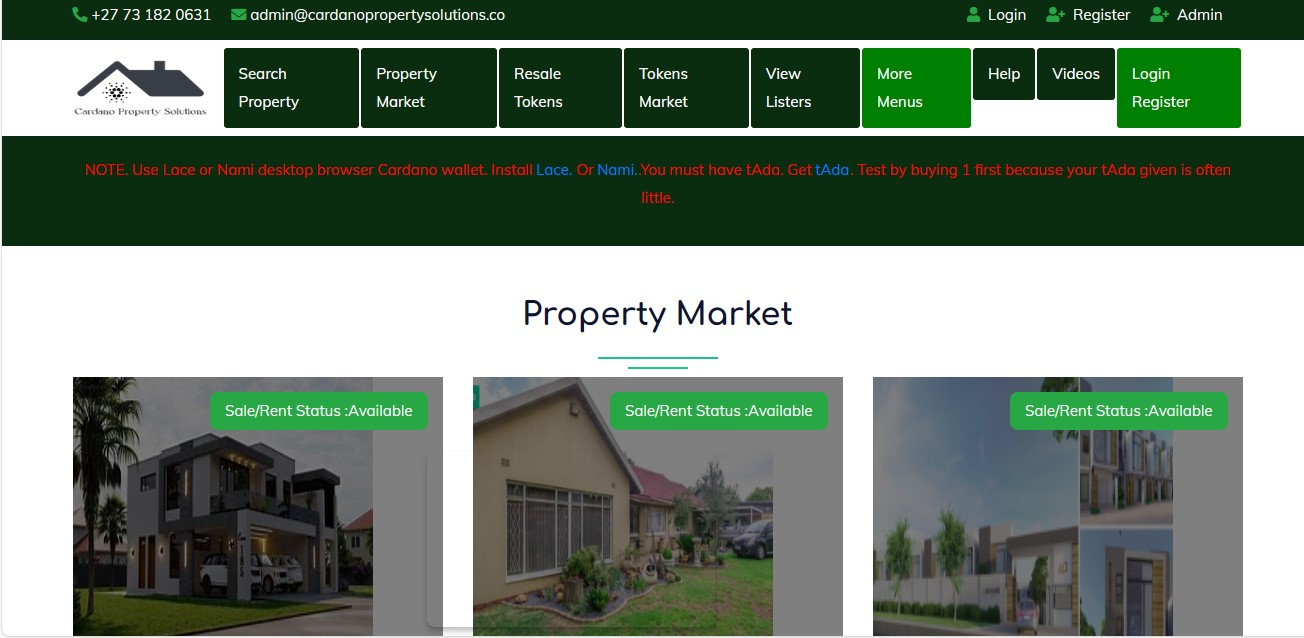
If you don’t have an account, you must start by registering. Follow these steps to create an account:
Steps to Register
-
Locate the Register Button
- Navigate to the top right corner of the webpage or application screen.
- Click the "Register" button to open the registration form.
-
Fill in the Registration Form
- Name: Enter your full name as you’d like it to appear in the system.
- Email Address: Provide a valid email address that you have access to. This will be used for account verification or notifications.
- Password: Create a strong password using a mix of letters, numbers, and symbols to ensure security.
-
Submit the Form
- After filling in all the fields, review your details to ensure they are correct.
- Click the "Register" button at the bottom of the form to submit your details.
-
Check Registration Confirmation
- If your registration is successful, a message such as "Registration Successful. Login" will appear.
Now that you’ve registered, you can proceed to log in and explore the features available in your account.
Login
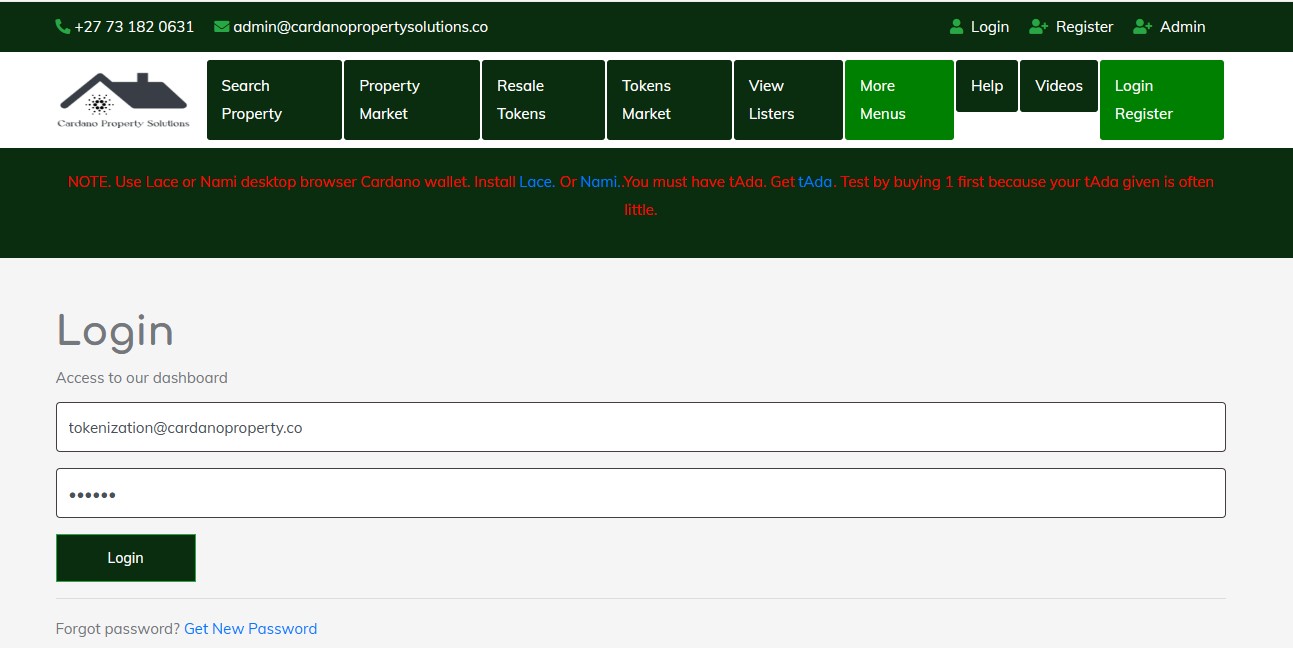 Once you have registered, you can log in to access your account. Follow these steps:
Steps to Log In
-
Go to the Login Page
- Navigate to the top right corner of the webpage or application screen and click on the "Login" button.
- This will open the login form.
-
Enter Your Login Details
- Email Address: Provide the email address you used during registration.
- Password: Enter the password you created when you registered. Ensure there are no typos, and check if Caps Lock is accidentally enabled.
-
Submit the Login Form
- After entering your credentials, click the "Login" button.
- If your login details are correct, you will be redirected to your account dashboard or the homepage.
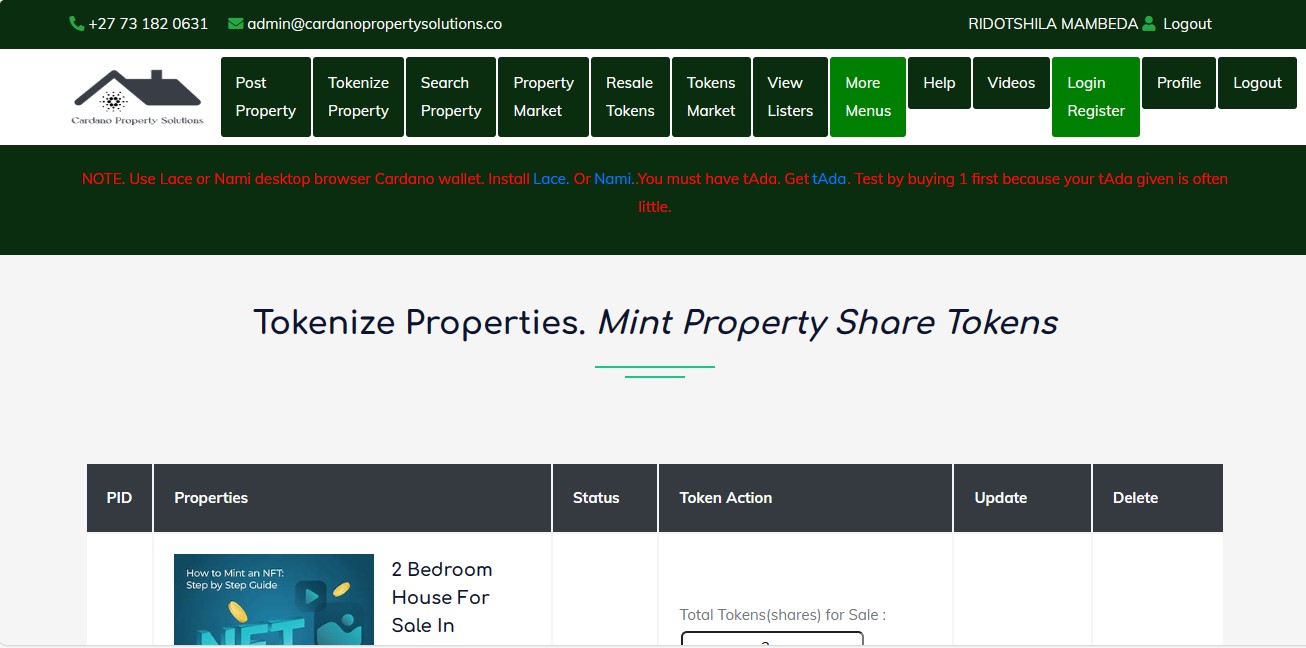 4. Forgot Your Password?
- If you cannot remember your password, click on the "Forgot Password" link below the login form.
- Follow the instructions provided to reset your password, usually by verifying your email address and setting a new password.
Troubleshooting Login Issues
- Incorrect Email or Password: Double-check your login details for typos.
- Account Not Registered: If you haven’t registered, go to the registration page and create an account first.
- Password Reset Issues: If you do not receive a password reset email, check your spam or junk mail folder. Ensure you entered the correct email address associated with your account.
Once logged in, you can access all the features available in your account. If you encounter further issues, contact support for assistance.
Posting a Property
To list a property on the platform, you need to choose Post Property from the navigating bar and fill out the Post Property form. Below are the steps to guide you through the process.
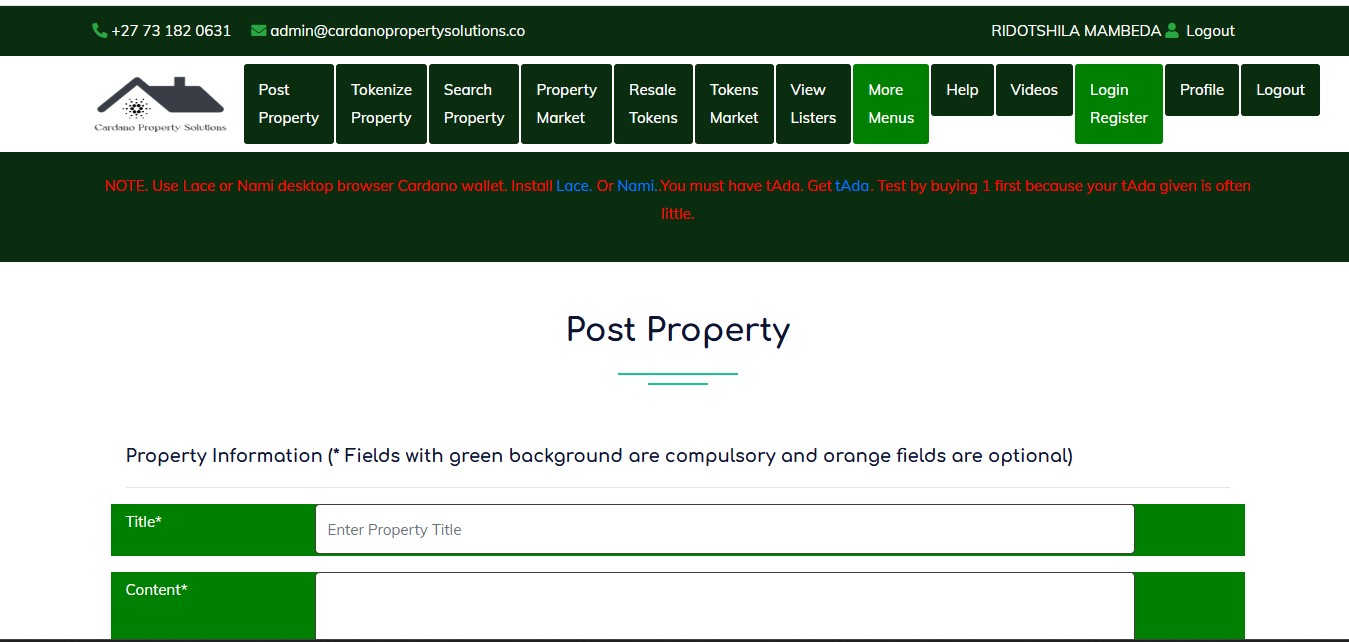
Steps to Post a Property
-
Enter Property Title
- In the Title* field, type a clear and descriptive title for the property (e.g., "3 Bedroom House in New York").
-
Add Content or Description
- In the Content* section, provide details about the property. Include key features, location highlights, and any additional information that will help attract buyers or renters.
-
Specify Property Details
Fill in the following fields to describe the property. This are optional.- Property Type: Select the property type (e.g., House, Apartment, etc.) from the dropdown menu.
- Bedroom: Enter the number of bedrooms (e.g., 3).
- Selling Type: Choose whether the property is for Sale or Rent.
- Balcony: Enter the number of balconies.
- Bathroom: Indicate the number of bathrooms.
- Kitchen: Specify the number of kitchens.
-
Enter Pricing and Area Information
- Price*: Enter the property price in dollars. Make sure to use numbers only, without spaces or punctuation (e.g.,
500000). - Area Size (optional): Enter the size of the property (e.g.,
850square feet or meters).
- Price*: Enter the property price in dollars. Make sure to use numbers only, without spaces or punctuation (e.g.,
-
Provide Location Details
Fill in the following mandatory fields to ensure the property is listed in the correct location:- City*: Enter the city where the property is located.
- State*: Specify the state of the property.
- Address*: Provide the full address. This field is required.
-
Upload Property Images
- Front House Image*: Upload a clear image of the front of the property. This is a required field.
- Kitchen Image (optional): You can upload an image of the kitchen if available.
- Back House Image (optional): Optionally, upload an image showing the back of the property.
- Dining Room Image (optional): Upload an image of the dining room if relevant.
-
Submit the Property Listing
- Once all the required details have been entered, click the "List Property" button to submit the form.
- If successful, your property will be posted on the platform for others to view.
Tips for a Great Listing
- Use clear and high-quality images of the property.
- Provide accurate and detailed information to attract serious buyers or renters.
- Ensure the price and location details are correct.
Once submitted, your property will appear in the property list for potential clients to view.
Viewing Your Properties
Once you have listed your properties, you can easily view and manage them by following these steps:
Steps to View Your Properties
- Navigate to "Tokenize Property"
This will take you to a dedicated page displaying a list of all the properties you have posted.
View Your Listed Properties
- On the "Tokenize Property" page, you'll see a list of all your properties, including titles, details, and images you provided during posting.
- You can review property information, check its status, and ensure everything is accurate.
Managing Your Properties
- Edit Properties: Look for the Update button to modify details like price, images, or descriptions.
- Delete Properties: Use the Delete option to remove properties you no longer wish to display.
Why Use the "Tokenize Property" Page?
The Tokenize Property page is a centralized hub to:
- Review and manage your listings.
- Confirm all posted details are accurate.
- Update or remove outdated listings.
By following these steps, you can efficiently manage your property listings on the platform.
Minting Share Tokens
To mint share tokens for a property, follow these steps carefully:
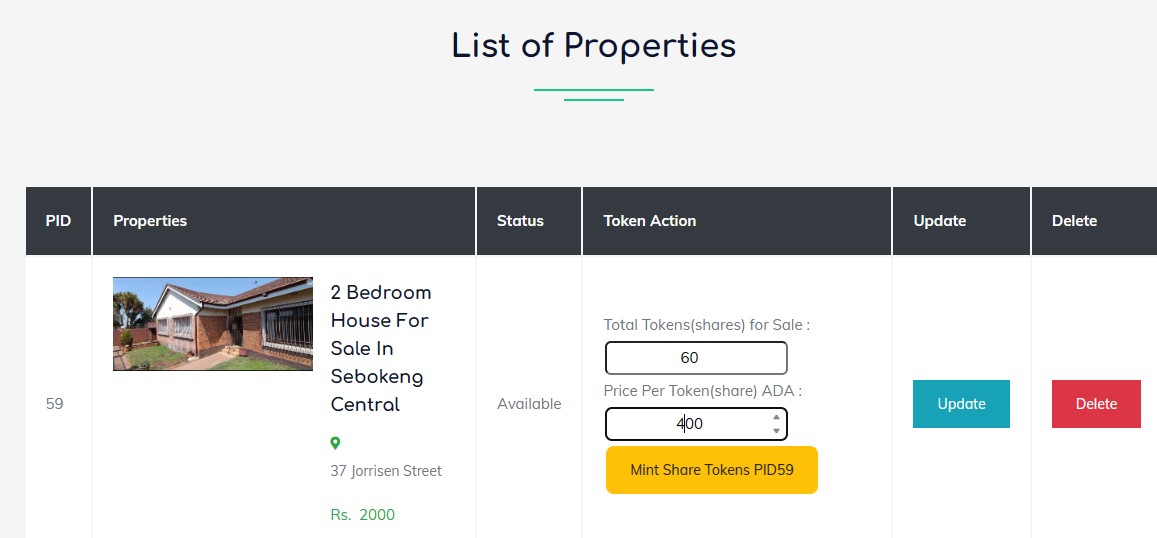
Steps to Mint Share Tokens
- Fill in Token Action Details
- Under the Token Action section, you will find fields to specify the following:
- Total Tokens (Shares) for Sale: Enter the total number of tokens (shares) you wish to mint. For example, enter
60if you want to create 60 tokens. - Price Per Token (Share) in ADA: Specify the price for each token in ADA. For example, enter
400if each token costs 400 ADA.
- Total Tokens (Shares) for Sale: Enter the total number of tokens (shares) you wish to mint. For example, enter
- Once all fields are filled, click the yellow button labeled "Mint Share Tokens PID59" to start the process.
- Under the Token Action section, you will find fields to specify the following:
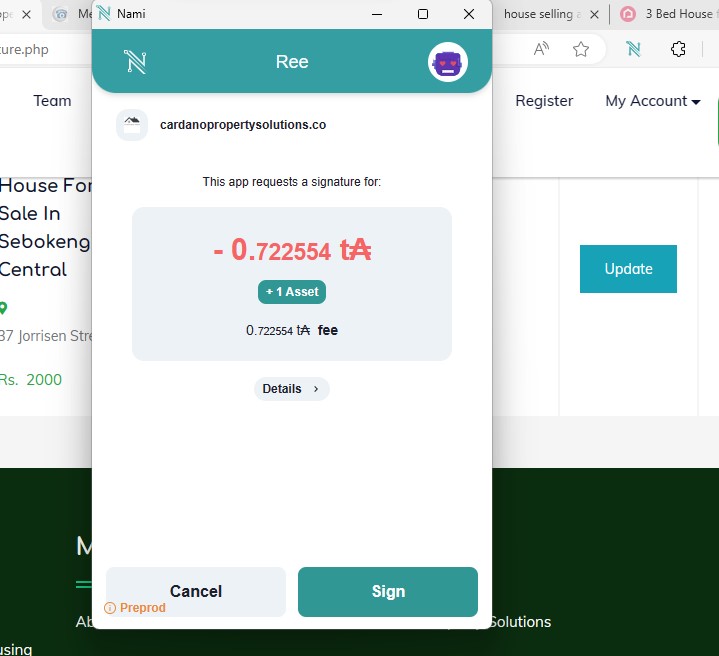
Then you will need to sign the transaction
- Verify Minted Tokens in Your Wallet
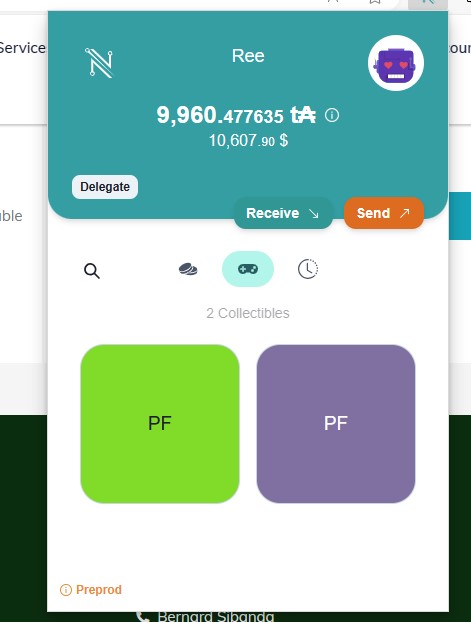
- Open your Nami Wallet and navigate to the Collectibles section.
- You will see the newly minted share tokens listed under your collectibles.
- This confirms that the tokens have been successfully minted and are now stored in your wallet.
Key Notes
- Ensure you have sufficient ADA in your wallet to cover the minting fees and transaction costs.
- If any step fails, check your network connection or wallet balance, and try again.
- Patience is key—minting may take a few moments to complete.
By following these steps, you will successfully mint property share tokens, and they will appear in your wallet for verification.
Selling Tokens (Shares)
Steps to Sell Tokens (Shares)
Follow these steps to sell your tokens (shares):
1. Navigate to Your Property
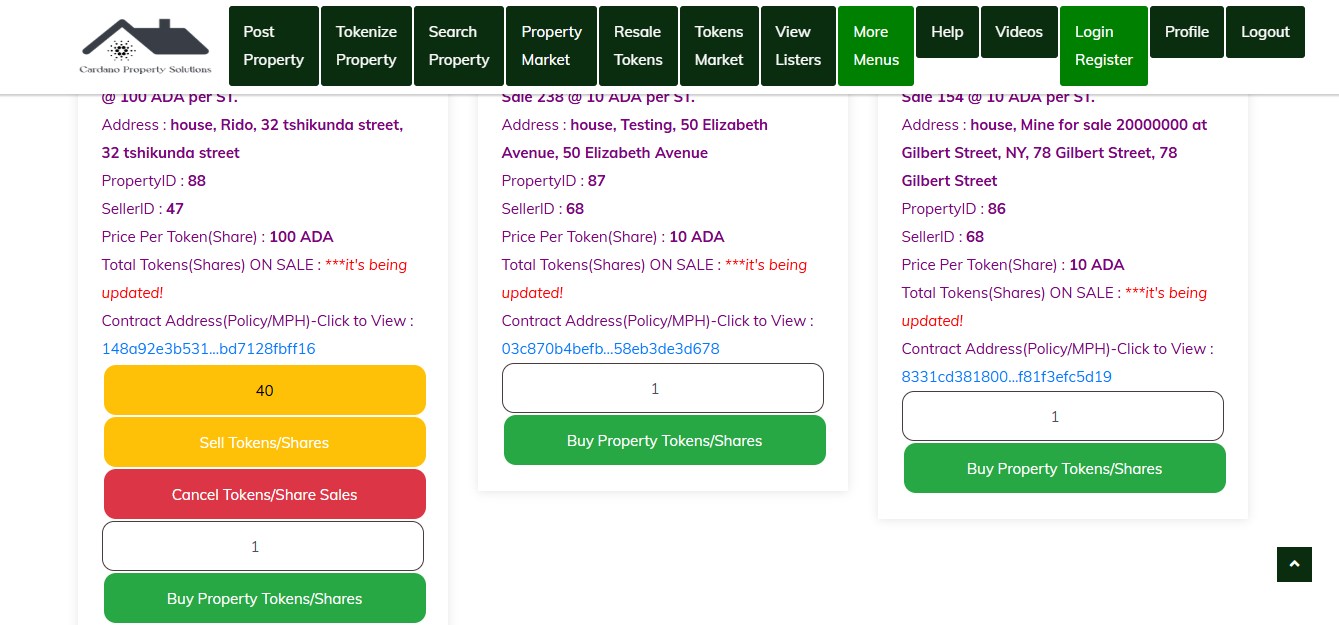
- Click on "Properties Market" in the navigation bar.
- Locate and select the property for which you want to sell tokens (shares).
2. Specify the Number of Tokens to Sell
- Enter the number of tokens (shares) you wish to sell in the input field provided.
- Click the yellow button labeled "Sell Tokens (Shares)".
3. Confirm the Sale
you will be prompted "Sell 10 Property Tokens Are you sure you want to sell 10 tokens" then click "yes".
after that you will need to sign the transaction to confirm.
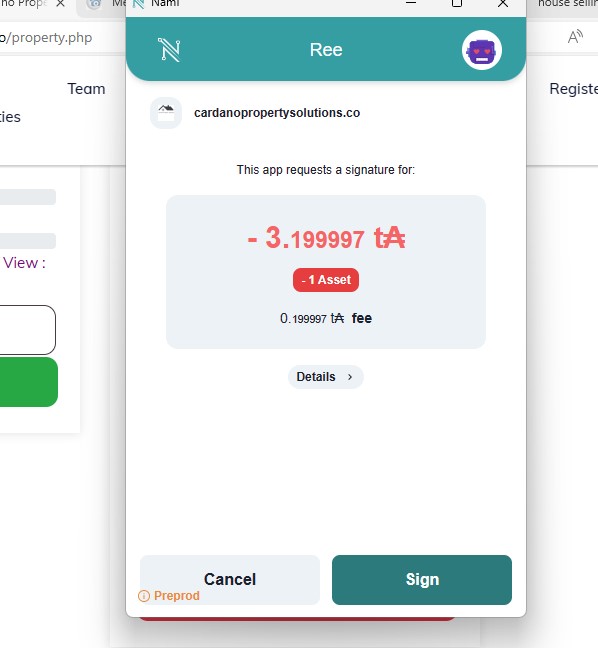
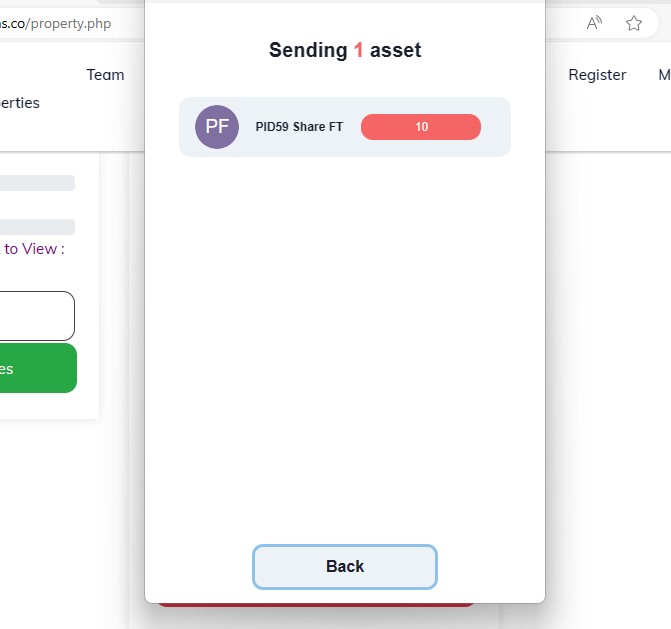
then when its successful it with give you a message "Congratulations, transaction is now on blockchain!"
4. Verify the Sale
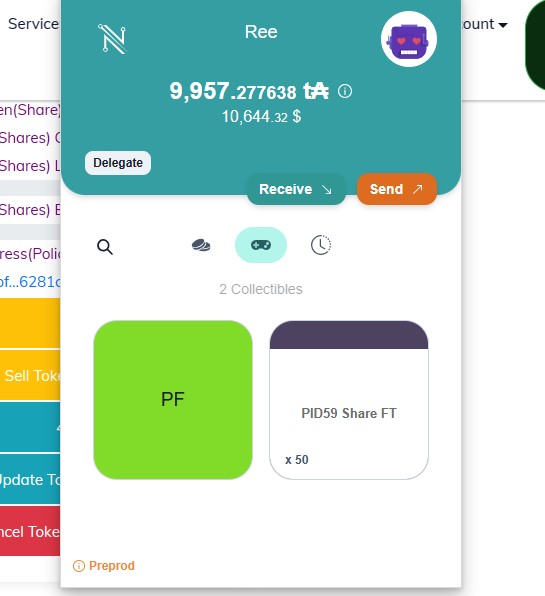
- Open your Nami Wallet and navigate to the Collectibles section.
- Check that the total number of tokens (shares) has been reduced by the number you sold.
5. View Updated Property Details
- Open the property details page for the property you sold tokens from.
- Verify the following:
- The "On Sale" section now displays the number of tokens (shares) you placed on sale (e.g., 10).
- The "Left" section reflects the remaining tokens (shares) you hold for that property (e.g., 50).

Example
Suppose you have 60 tokens (shares) for a property.
- If you sell 10 tokens:
- On Sale will show 10 tokens.
- Left will show 50 tokens in your account.
- Your Nami Wallet will reflect the updated balance under the Collectibles section.
Important Notes
- Ensure you have your Nami Wallet connected before starting the transaction process.
- Double-check the number of tokens (shares) you wish to sell before confirming the transaction.
- You can track all successful transactions on the Cardano blockchain for transparency and security.
- If you encounter any issues during the process, contact support for assistance.
Next Steps
Once you've successfully sold tokens:
- Consider promoting your property to attract more buyers.
- Use the proceeds for reinvestment or other purposes as needed.
- Keep an eye on the blockchain for updates related to your transactions.
Cancel Tokens/Shares Sale
If you wish to cancel the sale of tokens (shares), follow these simple steps:
Steps to Cancel
- Locate the "Cancel Tokens/Shares Sale" option.
- Click on the red button labeled "Cancel Tokens/Shares Sale".
- A series of alert messages will appear. Click OK to confirm each step of the process.
Alert Messages
-
Step 1: Are you sure you want to cancel the property sale?
Confirm your intention to cancel the sale. -
Step 2: Cancelling the Property Sale has started. Be patient. Things may fail. First step is setting up prerequisites.
The system prepares the prerequisites for the cancellation process. -
Step 3: Setting up prerequisites successfully done. Next is creating the transaction body and submitting it to the Cardano blockchain.
The transaction is built and sent to the blockchain.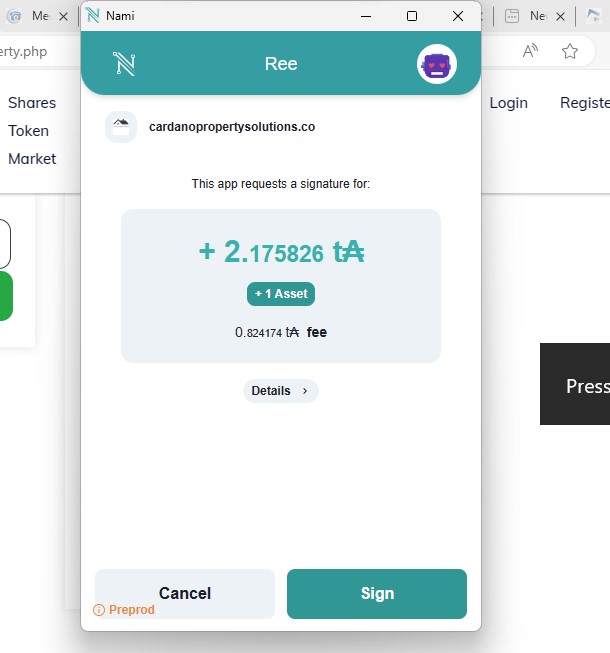
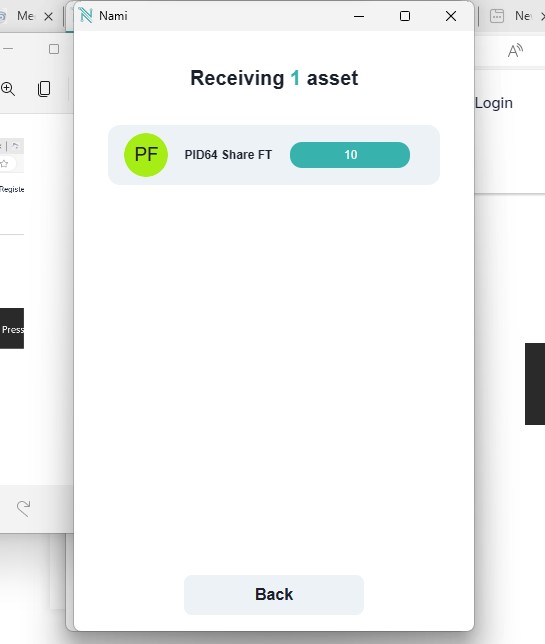
-
Step 4: Congratulations! The Property Sale has been cancelled successfully.
The sale cancellation is complete, and your tokens are restored.
Important Notes
-
Cancelling a sale only applies to the latest tokens (shares) you have listed for sale.
-
Once the sale is successfully canceled, check your Nami Wallet:
- Your token balance will reflect the restored tokens under the Collectibles section.

Why Cancel a Sale?
Canceling a token (share) sale might be necessary if:
- You decide not to sell your shares.
- Market conditions change, and you prefer to hold onto your tokens.
- Errors were made in the listing process.
By following this process, you can ensure that your tokens are securely returned to your wallet and removed from the sale listing.
Buy Tokens/Shares
The platform also allows you to purchase your own tokens (shares) directly. Follow these steps to buy tokens easily and securely.
Steps to Buy Tokens/Shares
- Enter the number of tokens (shares) you wish to buy in the provided field.
- Click on the green button labeled "Buy Tokens/Shares".
- A series of alert messages will appear to confirm the purchase. Click OK to proceed.
Alert Messages
- Step 1: Are you sure you want to buy 5 Property Tokens? T&Cs apply.
Confirm your intent to proceed with the purchase. - Step 2: Processing the purchase of property tokens begins. Be patient. Things might fail. First, we set up prerequisites.
The system prepares the required setup to initiate the transaction. - Step 3: Prerequisites have been successfully set. Now building and submitting the transaction body to the Cardano blockchain.
The transaction is constructed and sent to the blockchain for final execution. - Step 4: Congratulations! Your purchase of property tokens was successful.
Final Check
After completing the purchase:
- Open your Nami Wallet to confirm that the newly purchased tokens are reflected under the Collectibles section.
- Verify that your property details now include the updated token balance.
Why Buy Your Own Tokens/Shares?
Purchasing your own tokens can be advantageous for:
- Increasing Ownership: Secure a larger share of the property.
- Strategic Flexibility: Adjust your holdings based on market conditions or personal goals.
- Correcting Mistakes: Reverse unintentional sales or updates to token quantities.
By following this process, you can effectively manage and enhance your ownership of tokenized assets within the Cardano ecosystem.
Conclusion
CardanoPropertySolutions.co is transforming the real estate industry by harnessing the power of blockchain technology to provide innovative solutions for tokenization and fractionalization.
By enabling fractional ownership, the platform opens doors to a broader range of investors, making property ownership more accessible and equitable. The integration with the Cardano blockchain ensures a secure, scalable, and cost-effective environment for managing digital assets.
Key Takeaways
- Lower Costs: Tokenization reduces the financial barriers to entry for property investment.
- Faster Transactions: Blockchain technology streamlines the buying, selling, and updating of property tokens.
- Democratized Wealth: Fractional ownership provides fairer opportunities for wealth distribution.
- Reliability and Security: Leveraging Cardano’s robust infrastructure ensures data integrity and transparency.
We invite you to explore the platform at CardanoPropertySolutions.co and experience the future of property investment.
Thank you for choosing CardanoPropertySolutions.co—where innovation meets opportunity in real estate.